
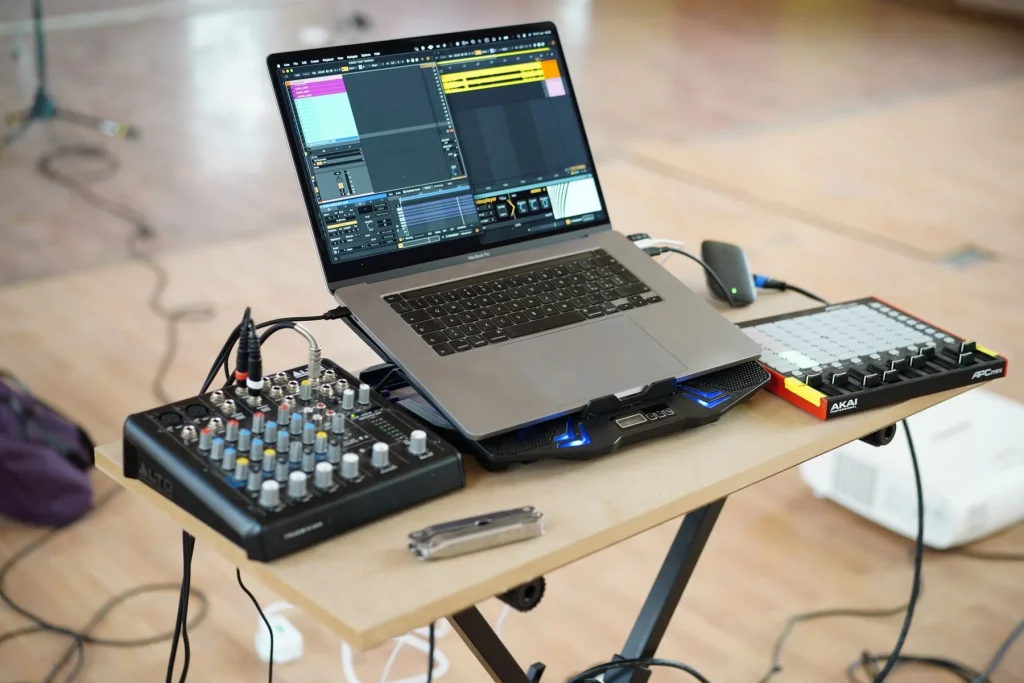
The promise: transform the way you prepare your sets to make a real impact on stage, from the studio to the venue. This article offers a clear method you can apply right away.
Producing tracks designed for mixing makes transitions easier and brings out your signature sound. Choosing a central tempo simplifies the flow of a set and limits excessive pitch changes. Exporting several versions at different BPMs preserves sound quality.
Preparation goes beyond a fixed playlist: it includes analyzing keys with tools such as Mixed in Key, building an extensive music library, and checking your equipment. These steps help make live performances reliable and smooth.
Finally, agreeing on logistics with the organizer and leaving room to improvise lets you adapt to the audience. For advice on building a music library and managing versions at different tempos, see this resource on preparing your playlist before an event.
Why preparing a set makes such a difference to your live performances
Structured preparation changes how you read the room and influence the crowd in real time.
Reading the room becomes easier when you have rehearsed several scenarios. By testing different track lists, transitions, and effects, you learn when to drop a track without breaking the energy.
An overly rigid set plan often leaves too little room to adapt. Prepare options instead: different openings, alternative exits, and harmonic reference points.
Put this into practice now
Schedule a practice session, record yourself, listen back, and correct your mistakes. Analyzing your tracks with Mixed in Key, Rapid Evolution, or KeyFinder makes it easier to work with their keys.
Impact on your technique and professional work
Clean transitions improve your mixing during live performances and strengthen the audience’s confidence in you. Thanks to this work, organizers are more likely to book you again.
One simple tip: follow this training guide to save time and avoid recurring mistakes.
In short, this article offers an action plan: rehearse, record yourself, analyze your performance, and take the stage with confidence. That is how preparation turns into stage impact.
Get to know the audience and setting before the event
Understanding who will be in the room helps guide every transition and musical choice. Studying the type of event, venue, schedule, and average age of the audience reduces surprises and helps you plan what comes next.

Event type, venue, schedule, and average age
Ask about the event format, noise restrictions, dress code, and likely preferences. This information helps you connect with different generations and set priorities for the opening, peak, and closing parts of the night.
Speak with the organizer and define the goal
Put the goal of the performance and each party’s interests into a simple contract. Specify the parties involved, date and time, duration, microphone announcements, electrical power, and necessary technical access.
Adapt styles and eras without losing your signature sound
Identify genres that are welcome or best avoided, and prepare edits, extended intros, or instrumental versions. Have fallback options ready in case the audience’s response calls for a change.
- Information to obtain: event type, venue, exact schedule, restrictions, dress code, and average age.
- Basic contract: scope, setup and teardown, onstage needs, storage, access, and payment.
- Technical setup: check the DJ booth, monitors, connections, and sound pressure level to ensure reliable technical access.
Send a short questionnaire before the event to gather this information. You can then have the organizer confirm your requirements and protect the quality of your performance.
DJing and music production: prepare your sets effectively
Aligning your studio methods with the way you mix creates a coherent live performance.
Produce tracks with your decks in mind
A productive cycle between music production and mixing: compose with transitions in mind, then test your tracks in the booth. Writing to suit the way you mix, and adapting your mixing to your production habits, makes everything flow more smoothly.
Structure tracks with clear intros and outros, recognizable breaks, and easy-to-spot drops. Mark the sections in your project and export clean stems.
- Mark sections and reference points for cues and loops.
- Keep dynamic headroom and consistent kicks for the club.
- Export at several BPMs from the source project to avoid extreme pitch changes.
- Prepare instrumental versions, dubs, and “DJ tool” edits for greater flexibility live.
Add tags to every file (BPM, key, energy, mood) to make decisions faster in the booth. Finally, take training in harmonic mixing and create your own guide: templates, export checklists, and naming conventions.
Build a strong music library instead of a fixed set plan
A well-organized library helps you respond to the dance floor more effectively than a fixed track order.
Organize your library by energy, era, key, subgenre, and time of night. This structure lets you find a track in one or two steps. Use consistent cue points so you can enter and exit tracks cleanly in most situations.

Storage and technical access
Choose reliable media: SSDs and SD cards, with a mirrored backup. Check access to your files before every performance and test synchronization between platforms to avoid broken links.
Flexible playlists or a fixed set plan
Smart, dynamic playlists based on BPM, key, rating, and tags for opening and peak-time tracks replace an unchangeable order. They give you alternatives when the mood in the room shifts.
| Element | Recommendation | Benefit | Risk if missing |
|---|---|---|---|
| Organization | By energy, key, and era | Quick searching | Wasted time |
| Storage media | SSD and mirrored backup | Reliable access | Equipment failure |
| Tagging | Key, energy, and vocals | Choices that suit the dance floor | Inconsistency |
| Routines | Weekly updates and BPM checks | Up-to-date library | Metadata problems |
- Selections suited to the setting: club, after-party, or wedding.
- Smart playlists for sorting by energy and BPM.
- Weekly routine: add tracks, clean up the library, and check keys and BPMs.
An overly strict set plan has cost a DJ an entire performance; a rich music library saved the next one.
To structure your work, download the “Boost Your DJ Playlists” guide and build these routines into your preparation before every set.
Tempo, key, and multiple versions of your tracks
Choosing a central tempo changes how tracks flow together and helps maintain energy.
Choose a central BPM for a coherent series of sets
A central BPM (for example, 200 for Frenchcore and 180 for industrial Hardcore) lets you align a substantial part of your selection.

Create versions at different tempos without compromising the sound
Avoid slowing a track too much with the BPM fader: taking it from 200 to 180 can distort its energy and key.
Export several versions from the project (195, 190, 185, and 180 BPM). Recalculate delays, check transients, and adjust the groove.
Harmonic mixing and key analysis tools
Use Mixed in Key, Rapid Evolution, or KeyFinder to identify keys.
Favor compatible transitions using Camelot or Open Key, along with subtle EQ, for clean blends.
| Focus | Practice | Result |
|---|---|---|
| Central BPM | Align most tracks | Smooth transitions |
| Multiple tempos | Export versions at 195, 190, 185, and 180 BPM | Preserved energy |
| Harmony | Identify keys and harmonic paths | Cleaner mixing during live performances |
Tip: keep an original-tempo version and a club-tempo version of every key track.
Mixing techniques that keep the dance floor moving
Mastering every cut and build changes how the crowd follows your musical journey.
Prepare entries and exits: mark the beginnings and ends of your tracks precisely. Set clear cue points and safety loops so you can follow each structure without hesitation.
Prepare entries, exits, drops, and structures
To land a drop, preview the track, check the timing, and leave dynamic headroom before the impact. Test the kick’s attack and identify where the drop will fit in the frequency spectrum.
Managing faders, BPM, and clean transitions
Work the BPM fader in small increments. Choose a gradual shift or a quick jump according to the moment.
- Options: a long harmonic blend, rhythmic cuts, added percussion, or a controlled exit with echo.
- EQ and filters shape the sound without overloading it when the keys are compatible.
- Rehearse critical transitions until the movements become familiar.
| Focus | Action | Effect |
|---|---|---|
| Cue points and loops | Precise marking | Confident entries |
| Drop | Previewing and dynamic headroom | Controlled impact |
| BPM fader | Gradual shift or quick jump | Natural transitions |
Listen to the room and adjust the length of your blends: sometimes short, sometimes extended, but always musical.
Practice, record, improve
Rehearsing different sequences helps you spot weak transitions before taking the stage.
Rehearse track lists, variations, and effects
Set up focused practice sessions with one goal per session, such as harmonic transitions, drops, or effects.
Vary tempos and track order to broaden your options and avoid relying on a single plan.
Play your sets for people who represent your audience and write down their specific feedback.

Record, analyze, and keep correcting
Record audio and video consistently so you can evaluate your performance with some distance. Then listen back methodically: identify strengths, weaknesses, and actions to test.
Learn to keep mixing when you make a mistake. Correct it in real time to simulate live conditions and build confidence.
- Keep your notes and recordings in one folder so you can find them quickly before a performance.
- Turn what you learn into practical checklists: cue points, key charts, and reliable transitions.
- Prioritize consistency: short, frequent sessions are more useful than long, irregular ones.
“I wanted to share this simple method: rehearse, record, correct, and start again.”
Practical tip: include these routines in your training and check access to your files and technical equipment before every rehearsal.
Equipment and logistics: avoid technical problems during live sets
Well-planned logistics are your best protection against technical incidents during a live set.
Checklists and tests: arrive several hours early and check everything. Test latency, drivers, software versions, and controller mappings. Confirm the available connections and necessary technical access to the booth.
Essential backups and protection
Duplicate your library on an SSD and an SD card to ensure storage and access to your tracks if your computer fails.
Bring extension cords, surge-protected power strips, gaffer tape, cable ties, and protection for your computer. These items help prevent technical problems during a live set.
Compatibility and advance testing
Check that your equipment works with the venue’s setup: connectors, monitors, stability, and the height of the stand for your decks.
Discreetly check the audio lines and speak with the resident DJ to avoid technical surprises.
Procedure and troubleshooting during the event
- Prepare a thorough checklist: sources, cables, adapters, interfaces, USB drives and SD cards, computer, and backups.
- Test the setup under realistic conditions before leaving.
- Emergency kit: power strips, lights, rain protection, tape, and cable ties.
- Procedure for a technical problem during a live set: isolate the source, bypass the failing component, and play a backup track.
Document every problem you encounter and its solution to improve your toolkit.
At a club or private event, knowing how to manage your equipment and organize your bag reduces stress. Keep a clear plan so you know how to handle any situation and can leave with confidence.
Improvise with a plan on the night
Knowing how to move between established harmonic paths makes live improvisation relevant and smooth.
Knowing each track’s structure and key gives you freedom and confidence. Record your rehearsals: listening back helps you improve your choices before the real set.
- Define an improvisation framework: energy markers, harmonic paths, and central BPMs that let you change direction smoothly.
- Watch the dance floor’s response (crowd density, cheers, and audience turnover) to choose the next track at the right moment.
- Keep reliable transitions and proven track pairings close at hand.
- Prepare cue points and loops: they shorten the time needed to make a decision.
- Use effects sparingly: prioritize musical choices over constant embellishment.
| Situation | Action | Result |
|---|---|---|
| Unexpected change in energy | Make a quick exit with a backup track | Regain control |
| Onstage announcement | Coordinate with the organizer | Keep the momentum going |
| A track choice is not working | Switch to a proven track pairing | Consistency throughout the night |
Accepting the unexpected is part of performing live: aim for consistency rather than sterile perfection.
Special cases: private events, clubs, and streaming
The demands of a private event differ greatly from those of a club or an online stream. Adapting your approach helps you avoid missteps and keep the performance flowing.
Tailored requirements and must-play tracks
For a private event, always confirm the three or four requested tracks and their order if the client specifies one.
Prepare alternatives with compatible energy and keys to preserve your artistic signature.
Tip: structure the night in “chapters” (welcome, family, closing) to give it shape without making it rigid.
Clubs: reading the room and handling the unexpected
In a club, a fixed track list often falls flat. Build selections by genre, era, and energy.
Focus on reading the dance floor: adjust blend lengths and intensity in real time.
Streaming a DJ set: technical demands and room for error
Before streaming a DJ set, test the interface, latency, and levels.
Document your setup (bitrate, buffer size, drivers, and controller mappings) and create a repeatable “live” profile.
Prepare backups: a stable source, extension cords, power strips, and protection for your equipment. Plan for copyright requirements too, and use authorized versions of tracks.
- Emergency option: switch to a stable source if a problem occurs.
- Coordinate with the organizer on technical access and booth safety.
- Finish with a review to improve your checklists and your next performance.
“A useful review turns every incident into a practical lesson for the next performance.”
Conclusion
The final stretch often shapes the audience’s lasting memory of a set. Bring production and mixing together by composing tracks that are easy to mix. Choose a central BPM and export versions at different tempos to preserve sound quality.
Build a flexible music library: tags, selections suited to the setting, and smart playlists make live track choices faster. Learn your keys with Mixed in Key or KeyFinder, and practice by recording yourself.
Secure your logistics with checklists, backups (SSD, extension cords, power strips, tape), and confirmation of storage and technical access. Define the performance goal and each party’s interests with the organizer in a contract to avoid surprises.
Take action now: schedule a practice session, update your library, and take training to develop a more professional approach. This article aims to turn preparation into concrete results at your next live performances.