
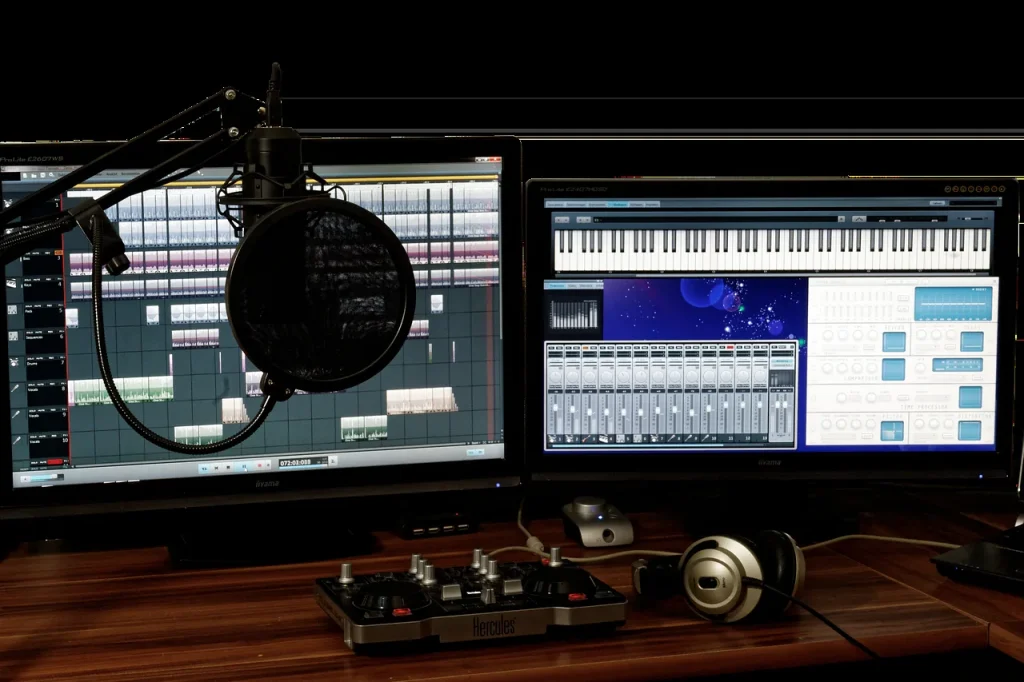
This buying guide for France aims to help you put together the right equipment for producing music in a home studio. We cover the essentials: a reliable computer, a stable audio interface, neutral monitoring, and a MIDI controller that suits the way you work.
The goal: prioritize purchases according to your needs—composing, beatmaking, mixing, or live performance—without getting lost in the options.
We emphasize neutral monitoring so you can make accurate mixing decisions. Plan for a multicore processor, 8 to 16 GB of RAM, a 512 GB SSD or larger, and a low-latency interface.
Here are some concrete starting points: Focusrite, Audient, and RME for interfaces; Sennheiser, Beyerdynamic, and Audio-Technica for headphones; ADAM, Yamaha, and Neumann for monitors; Arturia, Novation, and Akai for keyboards and pads.
Finally, check compatibility with your DAW and operating system, and upgrade gradually. For a complete overview, see this music production equipment guide.
Introduction: buying music production equipment in France today
With a modern computer and a DAW, creating music at home has become accessible and reliable. This guide aims to help you buy the right equipment at the right price for your experience level.
To get started, prioritize three things: a stable computer, quality monitoring headphones, and a MIDI controller that suits the way you work. Later, an audio interface becomes essential for reducing latency and managing inputs and outputs.
In France, both new and secondhand options are available through sources such as Back Market and specialist secondhand markets. Check Audiofanzine to compare user reviews before buying.
“Try DAW and plugin demos: they are the surest way to check whether the workflow and features meet your needs.”
- Define your needs: musical styles, goals, and space constraints.
- Match your budget to your plans for demos, mixing, or live performance.
- Prioritize quality: durable equipment and neutral monitoring improve your decisions.
| Item | Priority | Price range | Note |
|---|---|---|---|
| Computer | High | €600–€2,000 | Multicore processor, 8 to 16 GB of RAM, SSD |
| Monitoring headphones | High | €70–€300 | Neutral and comfortable; open-back or closed-back depending on your surroundings |
| Audio interface | Medium to high | €100–€1,000 | Latency, preamps, and number of inputs and outputs |
When choosing software, compare Ableton Live, FL Studio, Logic Pro X, Cubase, and others. This best DAW comparison is a good starting point.
Controllers and instruments for music production: how to choose
The right controller speeds up your creative process and makes every session easier.

Identify your needs: harmony-focused composition, rhythm-focused beatmaking, mixing, or live performance. Each calls for different equipment. Try controllers in a store to feel how they respond under your fingers.
MIDI keyboards, pads, and fader surfaces
MIDI keyboards (Arturia KeyLab, Novation Launchkey, NI Komplete Kontrol) remain ideal for playing virtual instruments. Choose 25, 49, or 61 keys according to your available space and desired range.
Pad controllers (Akai MPK, Ableton Push 3) are useful for finger drumming and launching clips. Fader surfaces make hands-on mixing and real-time automation easier.
Software integration and MIDI mapping
Ableton Live lends itself to performance through its Session View. Push 3 offers deep integration, while Akai and Novation provide ready-to-use mappings.
“A controller preconfigured for your DAW saves time and helps you stay inspired.”
- Check compatibility with multiple DAWs and their integration scripts.
- Assess quality: aftertouch, velocity response, faders, and pads.
- Ensure your computer and controller work well together for a smooth workflow.
| Profile | Recommended equipment | Main advantage |
|---|---|---|
| Composer | 49- to 61-key keyboard (Arturia, NI) | Expressive playing and access to virtual instruments |
| Beatmaker | 16-pad controller (Akai MPK, Push 3) | Groove and quick sampling |
| Mixing and live performance | Fader surface or DAW controller (APC, MPK) | Hands-on automation and reliable performance |
Computer and audio interface: the heart of your studio
Your computer and audio interface determine how responsive and stable your sessions feel.
Recommended specifications for 2025
Processor: a recent multicore model (Intel i7/i9, AMD Ryzen 7/9, or Apple Silicon M3/M4) can handle tracks and plugins without audio dropouts.
RAM: 8 GB minimum, ideally 16 GB or more for complex projects and large sample libraries.
Storage: a 512 GB to 1 TB SSD for the operating system, DAW, and libraries. Keep a hard drive for archives and backups.
Mac or PC: how to choose
Apple Silicon offers excellent performance and battery life, but can limit hardware upgrades. macOS 11 or later is recommended, especially if you use Logic Pro X.
On Windows, choose Windows 10 22H2 or Windows 11 22H2 or later, with a Ryzen 7/9 or Intel i7/i9 for good value.
Check that your software and plugins support the operating system to keep your setup useful for longer.
Why an audio interface matters
An interface reduces latency, manages inputs and outputs, and provides reliable preamps and converters. Without one, real-time recording becomes more difficult.
“A stable interface and well-maintained drivers make a noticeable difference to your workflow.”
- Entry-level models: Behringer UMC202HD, Focusrite Scarlett Solo, and 2i2.
- Midrange models: Audient iD14 MKII, Arturia MiniFuse.
- High-end models: RME Babyface Pro FS, UA Apollo Twin X Duo.
| Item | Recommendation | Why |
|---|---|---|
| RAM | 16 GB or more | Comfortable use of multiple plugins and sample libraries |
| SSD | 512 GB to 1 TB | Fast loading and stability |
| Interface | Focusrite, Audient, RME, or UA | Reliable drivers, quality preamps, and low latency |
Budget tip: increase the RAM and add an SSD to an existing computer to improve performance without replacing everything.
To compare interface models and narrow your choice, see this selection of studio audio interfaces.
Monitoring headphones: a smart choice for beginners
Good monitoring headphones change your sessions: they reveal problems and guide your mixing decisions.
Why start with headphones? They are relatively affordable and provide a consistent listening experience regardless of your room. That makes them ideal when the room has not been acoustically treated.

Open-back or closed-back: accuracy, isolation, and uses
Open-back headphones offer a wide stereo image and great detail. They excel at mixing, but leak sound.
Closed-back headphones provide better isolation. They suit recording and noisy environments.
“Choose neutrality over a flattering hi-fi sound if you want mixes that translate faithfully to other systems.”
Quality and budget benchmarks
Here are reliable models at different experience levels and prices: Superlux HD681 (entry level), AKG K240 MKII, AKG K702, Sennheiser HD 560S, Beyerdynamic DT 900 Pro X, Sennheiser HD 650, Sony MDR-MV1, and Neumann NDH 30 (a high-end reference).
Try them in a store and compare the ATH-M50X and DT-990 Pro to hear the differences in their sound signatures.
- Choose neutrality over boosted bass.
- Consider comfort: weight and ear pads matter during long sessions.
- Price is not the only factor; accuracy and consistency matter more.
| Use | Recommended model | Main strength |
|---|---|---|
| Entry level | Superlux HD681, AKG K240 MKII | Low price and good accuracy for getting started |
| Midrange | Sennheiser HD 560S, AKG K702, Beyerdynamic DT 900 Pro X | Balance, comfort, and better neutrality |
| High end | Sennheiser HD 650, Sony MDR-MV1, Neumann NDH 30 | Mixing references with very accurate response |
Studio monitors and room acoustics
Low-frequency reproduction depends as much on the room as on the speakers. To choose the right pair, start by matching the woofer size to your room.

Match the woofer size to the room
Models with 3- to 5-inch woofers suit small rooms: they have limited bass but good upper-midrange accuracy.
Models with 5- to 7-inch woofers are versatile choices for a medium-sized home studio, balancing bass extension and accuracy.
Models with 8-inch woofers or larger suit big rooms or electronic music that calls for deep bass.
Models by price range
Entry level: Presonus Eris 3.5, Mackie CR3-X, M-Audio BX4.
Midrange: ADAM T5V, Yamaha HS5, KRK Rokit RP5 G4.
Reference: Neumann KH 120 II, Focal Solo6, Genelec 8030C.
Placement, treatment, and subwoofers
Arrange the pair and your listening position in an equilateral triangle, with tweeters at ear height. Leave space from the rear wall and keep the setup symmetrical.
Treat the first reflection points and add bass traps if possible: room acoustics remain crucial.
“A properly calibrated subwoofer fills in the deepest bass; adjust its level and phase to avoid peaks.”
- Recommended subwoofers for electronic music: Adam T10S, Yamaha HS8S, KRK S8.4, Neumann KH 750 DSP.
- Switch between monitors and headphones to check your decisions on different listening systems.
- Pair your monitors with your computer and interface to create a coherent signal chain.
| Use | Woofer | Strength |
|---|---|---|
| Small room | 3 to 5 inches | Accuracy, with less bass impact |
| Home studio | 5 to 7 inches | Good balance |
| Large room or electronic music | 8 inches or larger, with a subwoofer | Greater bass extension |
Essential software, DAWs, and plugins for music production
Your choice of software often affects how quickly you finish a project and how comfortable the work feels.

Leading DAWs: Ableton Live excels at clip-based performance and integrates closely with Push 3 and Max for Live.
FL Studio remains popular with beatmakers for its step sequencer. Logic Pro X is optimized for macOS and offers excellent value. Cubase, Studio One, and Pro Tools suit recording sessions and advanced editing.
Useful plugins and libraries
Essential synthesizers: Serum, Massive, Sylenth1, Omnisphere, Nexus. Prioritize well-regarded reverbs, delays, and compressors among effects. Sample services such as Splice and Loopcloud speed up creation.
Try before you buy
Try demos to check processor load, latency, and usability on your computer. Check KVR and Audiofanzine for reviews and compatibility information.
“Tools cannot replace your ears, but a good software setup makes the work easier and improves quality.”
| Item | Strength | Practical advice |
|---|---|---|
| Ableton Live | Clip-based performance and creativity | Try Push 3 and Max for Live |
| FL Studio | Fast beatmaking | Check VST stability on Windows |
| Logic Pro X | Apple ecosystem and included plugins | Available only on macOS |
| Synthesis plugins & samples | Accessible sound quality | Start with demos and bundles |
Typical setups by budget and experience level
Even on a small budget, you can build a reliable production setup that can grow with you.
Entry level: a computer with 8 to 16 GB of RAM and a 512 GB SSD, neutral headphones (such as the HD 560S or DT 770 Pro), and a compact controller (Akai MPK Mini or Novation Launchkey 25).
Add a simple interface (Scarlett Solo or MiniFuse 1) as soon as you can to reduce latency and make clean recordings.
Midrange
Move up to an interface such as the Scarlett 2i2 or Audient iD14 MKII and a pair of 5-inch monitors (ADAM T5V, Yamaha HS5).
A 49-key keyboard (Arturia KeyLab Essential 49) and a few carefully chosen software additions can quickly improve your workflow.
High end
Invest in an RME Babyface Pro FS or UA Apollo Twin X Duo interface, Neumann KH 120 II or Genelec 8030C monitors, and an advanced controller (Push 3, KeyLab 61).
“Balance your purchases: monitors suited to your room and an interface you can grow with are more valuable than one isolated high-end component.”
| Level | Essentials | Main strength |
|---|---|---|
| Entry level | Computer, headphones, small controller, simple interface | Good value |
| Midrange | Two-input interface, 5-inch monitors, 49-key keyboard | Better fidelity and comfort |
| Professional | Professional interface, reference monitors, advanced controller | Performance and flexibility |
For detailed setups tailored to your needs, see this overview of typical home studio setups.
Good practices: studio maintenance, backups, and organization
Regular maintenance prevents many failures and protects your work.
Hardware maintenance: dust surfaces and vents, clean connectors, and inspect cables to prevent intermittent connections.
Updates: keep your DAW, interface drivers, and firmware up to date. This improves software stability and recording quality.
Backups: follow the 3-2-1 rule: three copies, two different types of storage, and one off-site copy (for example, on Dropbox or Google Drive). Back up plugin presets, libraries, and licenses too.
Organization: give projects clear names, create folders for each session, and keep numbered versions. A tidy workspace saves time and reduces stress.
“Setting aside time each week for maintenance and archiving is often the best preventive investment.”
| Action | Frequency | Recommended tool |
|---|---|---|
| Dusting & cable checks | Weekly | Microfiber cloth, contact cleaner |
| Software and driver updates | Monthly | Developer website, update manager |
| 3-2-1 backup | After every session | External drive and cloud storage (Dropbox or Google Drive) |
Conclusion
To produce music, first strengthen your signal chain: a reliable computer and stable audio interface remain the foundation. Neutral headphones are often enough if your room has not been treated.
Make choices based on your needs and available time: a controller that integrates well with your DAW speeds up creation. Then choose monitors that suit your space and musical style to refine your mixes.
Try demos, keep your software updated, and back up your projects regularly. This guide aims to help you buy equipment and improve the quality of your sessions. Return to this article when you are ready to upgrade.